

Graphics Issue.

|
Graphics issue.
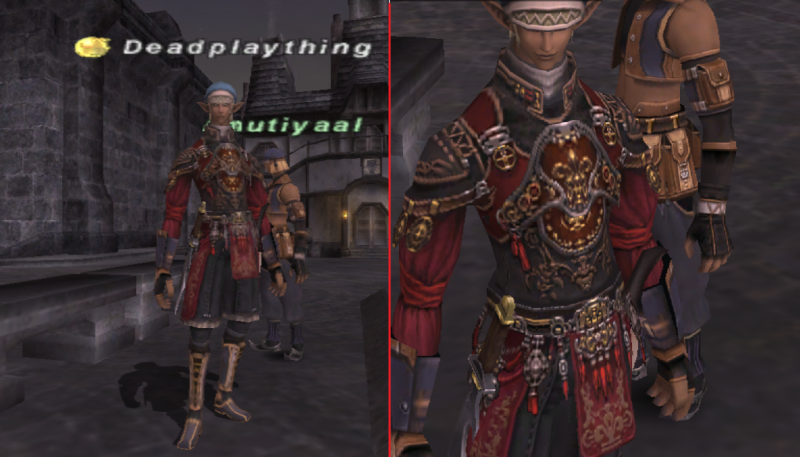
I am having an issue with my graphics I have ran through all the settings so I think and Cannot figure out why when i Zoom out it is blurry on characters and its clear when I zoom in. IF there is something I am missing let me know. Also the background scenery comes through crystal clear as you can see in the Screen shots here. On the left is zoom out and on the right you see the zoom in quality. please tell me what I need to do .
Bump until a reply.
As far as I can tell it is just the way your video card is rendering those textures at that distance.
As how to fix it- could be any/lots of combination of settings for the video card. Well I remember I had an issue in the past where I had to rollback my drivers because all my characters were all shiny but background was fine when i say shiny i mean no fine lines just blurry shiny objects running.
Are you forcing Mip Mapping?
"Mip Mapping is the process of reducing large textures into smaller ones to optimize for display at a distance. Mip mapping will reduce the amount of "sparkle" in distant options and smooth out distant textures. However it will also cause a slight reduction in detail." If it's really high- it might be doing that to the textures at that distance? It might be registering your char as "far away" when zoomed out- but the backgrounds are not "far away" yet so it's not doing it to them. Im doing what my ls suggested from a forum to adjust all the numbers to best quality. Im not 100% on what im doing but it was in the regedit files
What do i need to do for best quality zoomed in and out with out it blurry
Cerberus.Deadplaything said: Im doing what my ls suggested from a forum to adjust all the numbers to best quality. Im not 100% on what im doing but it was in the regedit files Go back to that post or w/e and use it to check the setting/value you put for it. I'm not sure how to do it in the registry as I have a program for res/mip editing. "With low MIP map setting on, you will constantly notice the level of detail being adjusted as you move around in your environment. The optimal setting is one to where you don't notice the changes unless you are watching for them." So can you see when the blur happens as you zoom out? If so- that is most likely because of your Mip Mapping setting. Hope someone replies who can help me get this mess figured out thank you for your help.
Unless ya try something all anyone can do is guess from the info given as I've done. Ya said you changed it in the reg at some point- start there and see if it's those values.
It can be any number of things w/o knowing more. Drivers, global video card settings, ff settings, reg settings.. k ill try my graphics first
then redo all my numbers for regedit i think your mip mapping is set too high... might be worth checking on the POLconfig to see what it's set at
http://ffxi.allakhazam.com/wiki/FFXI_Graphics
I could be wrong but it sounds like you may be referring to under sampling/oversampling. This link gives a fairly good explanation on making the "Stair case" effect go away. So I understand that part but the zoom out makes it blurry but zoom in its nice what causes that?
Bahamut.Paulus said: http://ffxi.allakhazam.com/wiki/FFXI_Graphics I could be wrong but it sounds like you may be referring to under sampling/oversampling. This link gives a fairly good explanation on making the "Stair case" effect go away. lol.. just Moogled "ffxi regedit" and the same page came up Cerberus.Deadplaything said: So I understand that part but the zoom out makes it blurry but zoom in its nice what causes that? I'm assuming it's your "Mip mapping" range. But what is the actual number you have in it? Oh ok i get it now ill try logging on with messing with that
I hadit set at 6 as adviced is that a bad idea? Ok that was very simply my Mip then I changed it from 6 to 0 and its perfect thanks guys.
Cerberus.Deadplaything said: Oh ok i get it now ill try logging on with messing with that I hadit set at 6 as adviced is that a bad idea? 6 will cause the Blurring effect to happen closer so as you zoom out the effect will happen sooner... i have it set to 3... but that's on an nVidia GT8000somethingorother |





All FFXIV and FFXI content and images © 2002-2026 SQUARE ENIX CO., LTD.
FINAL FANTASY is a registered trademark of Square Enix Co., Ltd.