UI Configurations

|
UI configurations
I want to see other peoples UI configurations. I'm at work and can't show mine atm but when I get home I will show mine, I'm not really pleased in mine so I was looking to see what others have to maybe fix mine up a bit, mine is all cluttered.
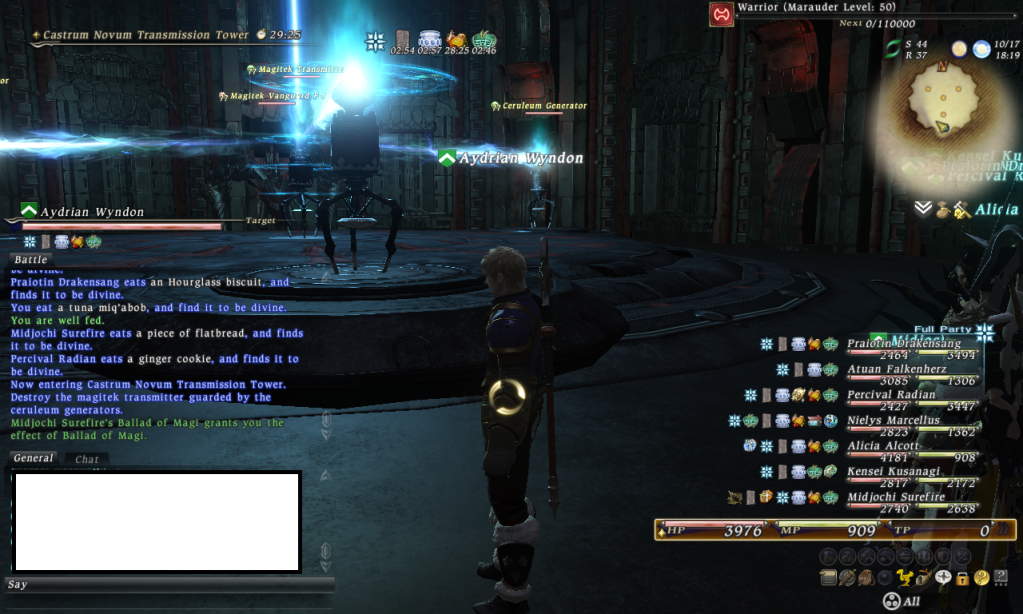 I have mine like this personally, the action bar is down at the very bottom between the text box and quick bar thing. Turning off the help text clears things up alot as long as you can remember where your abilities are. I know some people also like the text boxes to be larger or in the middle of the screen. It's been the same since Dec 2010.
 When I target someone, it shows up right above chatbox on the left hand side & when doing leves or missions it shows on upper left hand side in the corner.
 I spent more time then I should have seeing if I could find myself in the Atomos pile XD
well i can seem to find where my pictures are being saved to once i take them lol....
If you are using the in game function should be something along the lines of My Documents > Games > FF XIV > Screenshots
Ok can't figure out how to take a screenshot with UI up....
Yeh I realized that after I posted... if you play in windowed mode you can click to your desktop keeping the window on top, press print screen, then paste into MS paint.
Not using windowed made and once I figure this out how I post the pic on here?
You would need to upload it on to a site such as photobucket then use the image code it gives you.
well i'll just say it rather then post it.... have general at bottom left corner battle on top both sized to almost half screen target bottom center my HP/MP/TP bar on top of that and action bar on top of that. xp bar bottom right corner PT info on top of it radar top right with connection status micro menu touching the top left part of the radar status/buff info bar top center and leve top left. sorry cant get the pic :(
Lakshmi.Kadengt said: » When I target someone, it shows up right above chatbox on the left hand side & when doing leves or missions it shows on upper left hand side in the corner. missdivine said: » Lakshmi.Kadengt said: » When I target someone, it shows up right above chatbox on the left hand side & when doing leves or missions it shows on upper left hand side in the corner. I dunno? lol. I just picked my pic and put it in. I play in 1920x1080 maybe that is why? |






All FFXIV and FFXI content and images © 2002-2025 SQUARE ENIX CO., LTD.
FINAL FANTASY is a registered trademark of Square Enix Co., Ltd.